Tuesday, January 6, 2015


Thursday, December 18, 2014
BlackBerry 9500 Storm hard reset

BlackBerry 9630 Bold

Reset the device
A full reset is sometimes referred to as a hard reset. Perform a full reset when you want to clear all settings, programs and data from RAM.
Caution if you perform a full reset, your BlackBerry Bold 9700 Bold2 or 9780 returns to its default settings and looses all information that is not recorded in ROM.
Before you delete your BlackBerry® device data or media card files, consider backing up these items so that you have a copy on your computer. CAUTION: If you have turned on encryption, the process for deleting all device data can take up to an hour to complete. You cannot stop the process after you start it. If you reset your device, the process restarts after the device restarts.
To perform a hard reset:
On the Home screen or in a folder, click the Options icon.
Click Security *gt; Security Wipe.
To delete data from the messages application, contacts application, and other applications, select the Emails, Contacts, Etc check box.
To delete all third-party applications that you have added, select the User Installed Applications check box.
To delete all files from your media card, select the Media Card check box.
Type blackberry.
Click Wipe.

Reset the device
A full reset is sometimes referred to as a hard reset. Perform a full reset when you want to clear all settings, programs and data from RAM.
Caution if you perform a full reset, your BlackBerry Curve 8520 or 8530 returns to its default settings and looses all information that is not recorded in ROM.
Before you delete your BlackBerry® device data or media card files, consider backing up these items so that you have a copy on your computer. CAUTION: If you have turned on encryption, the process for deleting all device data can take up to an hour to complete. You cannot stop the process after you start it. If you reset your device, the process restarts after the device restarts.
To perform a hard reset:
On the Home screen or in a folder, click the Options icon.
Click Security *gt; Security Wipe.
To delete data from the messages application, contacts application, and other applications, select the Emails, Contacts, Etc check box.
To delete all third-party applications that you have added, select the User Installed Applications check box.
To delete all files from your media card, select the Media Card check box.
Type blackberry.
Click Wipe.
Reset the Blackberry 9500 or 9530 device
A full reset is sometimes referred to as a hard reset. Perform a full reset when you want to clear all settings, programs and data from RAM.
Caution if you perform a full reset, your BlackBerry Storm 9500 or 9530 returns to its default settings and looses all information that is not recorded in ROM.
Before you delete your BlackBerry® device data or media card files, consider backing up these items so that you have a copy on your computer. CAUTION: If you have turned on encryption, the process for deleting all device data can take up to an hour to complete. You cannot stop the process after you start it. If you reset your device, the process restarts after the device restarts.
To perform a hard reset:
1. On the Home screen or in a folder, click the Options icon.
2. Click Security *gt; Security Wipe.
* To delete data from the messages application, contacts application, and other applications, select the Emails, Contacts, Etc check box.
* To delete all third-party applications that you have added, select the User Installed Applications check box.
* To delete all files from your media card, select the Media Card check box.
1. Type blackberry.
2. Click Wipe.
Thursday, December 11, 2014

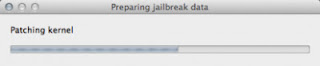
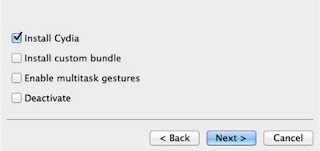
Way to Jailbreak iPhone 4 On iOS 5 1 With Redsnow Mac OS X
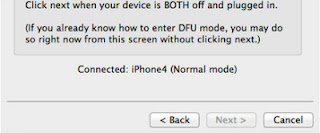
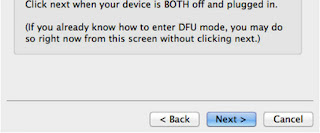
- Hold down the Power (corner) button for 3 seconds
- Without releasing the Power button, also hold down the Home (bottom center) button for 10 seconds
- Without releasing the Home button, release the Power button BUT KEEP holding the Home button for 15 seconds
Sunday, December 7, 2014

Monday, November 24, 2014
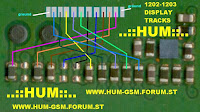
Nokia 1202 1203 LCD Repair
Please save this images as your reference material if someday you find a problem on LCD Nokia 1202 and Nokia 1203.
Nokia 8310 Mic Problem
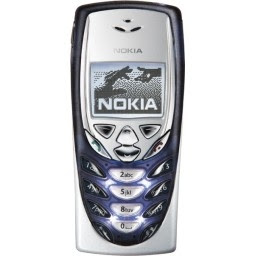 the information we give this time is the information about the Nokia 8310. On the Nokia 8310 mobile phone is often a problem occurs in Microphone.
 Problems with microphone can be caused by a broken line or a broken microphone. However, these days we have received 3 pieces Nokia 8310 mobile phone. Complaint is when to call, our voice was not heard by the other person.
At first we thought that the microphone is broken, but after we checked, still a good microphone. The next step we check the microphone channels, the result no broken lines.
It turned out after our study, the damage caused by installing the bolts on the mobile cracked bone, so that when we tighten the bolts, the PCB board is not attached properly due to loose bolts. This causes the connection between the microphone with the PCB board to be not perfect.
To fix this, replace bone or you can provide the lead on the microphone on the PCB. This is a simple step but provides a real solution.

Sunday, November 23, 2014

Friday, November 21, 2014
How to install downloaded applications in Windows Phone 8 1 Store
- Install applications on SD card through our terminal to save space on the phone memory.
- Move installed to SD card or SD card applications being able to free up the phone and installed applications.
Click on options and see an option that had previously not now appears to install local applications. If we click on it we get a list of applications and is compatible and can install it we can select.
It is a good method if we unloaded a heavy application as it can be a game in hand even gigas and we have to install it on multiple terminals. Now available even without SD card terminals. Of course, we can only install applications we can install from the store itself .
Thursday, November 20, 2014


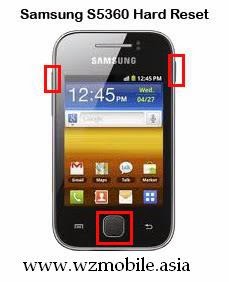
samsung s5360 hard reset code
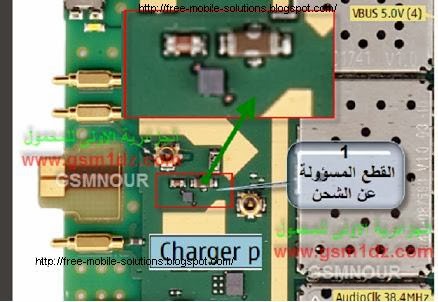
nokia n8 charging ways
How to receive pictures by text message on HTC Droid
- Go to the " Start" Lcd, press the button that says "Start " button below the Lcd with the image of a house.
- Click " Applications" in the lower left corner of the Lcd and select " Messages" .
- Tap the message to open MMS .
- You can view or download the attachment. To view simply click the attachment and wait a minute. To download on your storage card, press and hold the name or number of the sender to display the options for that message. Click " Save [ attachment type ] " and after downloading the attachments , you can see them in the "Gallery " application .
Tips and Warnings
- If you have your Droid Incredible configured to automatically notify you when you arrive and MMS text messages , you can open the message directly instead of locating in the tray of "messages " . The notification icon appears in the status bar at the top of the Lcd. Just press the status bar and swipe down the Lcd, then tap the notification to open the message .
- To view or download attachments you use your phone s data plan. You can always see the size of the attachment on the MMS message before really download it.
Wednesday, November 19, 2014

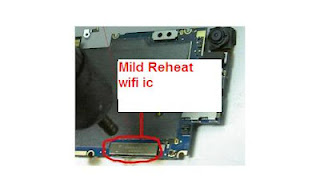
iPhone 3G Wi Fi Not Working Problem Repair Solution


Tuesday, November 18, 2014
nokia n82 power on off button switch jumper ways
Just follow and trace the line paths shown on the solution below.
