Showing posts with label sim. Show all posts
Showing posts with label sim. Show all posts
Wednesday, November 12, 2014


Saturday, November 8, 2014

Friday, November 7, 2014
Nokia C1 00 Insert SIM card Problem Solution


Nokia C1 00 Insert SIM card Problem Solution
Nokia Asha 230 Insert Sim Solution With Jumper Way

Nokia Asha 230 insert sim problem solution With Jumper Way . 100% Tested
Nokia Asha 230 Sim ic jumper. Nokia Asha 230 Dual Sim Not Working SolutionSunday, October 26, 2014
Nokia 7210 Supernova Insert Sim Card Problem solution
Heres a solution to repair hardware related issues for Nokia 7210 supernova Insert sim card problem. This solution shows the location of the particular components such as chip resistors and chip coil that might get damaged if the said problem occurred.

Hints for repair: check the sim socket pin connector if free from corrosion and oxidations. Check the Vsim power supply voltage line paths from the Vsim chip capacitor located near the power supply IC. check and replace the corresponding connected resistors which has a value of 33 ohms.
Nokia 7210s Insert Sim card Solution

Hints for repair: check the sim socket pin connector if free from corrosion and oxidations. Check the Vsim power supply voltage line paths from the Vsim chip capacitor located near the power supply IC. check and replace the corresponding connected resistors which has a value of 33 ohms.
Thursday, October 23, 2014
Blackberry 9000 Cellular phone sim ways repair solution
blackberry 9000 cellular phone sim ways repair solution ,blackberry cellular phone not accept sim card solution ,blackberry 9000 sim card not working solution ,blackberry 9000 sim card line not working repair solution blackberry 9000 sim card jumper ways not working ,insert sim card solution this problem face 1st try this phone all line check this ways after not not line any pin check my solution this solution many time working me and always 100% tested solution this try and working this i hope solved your blackberry 9000 not accept sim card and insert sim card solution
and all cellular mobile repairing solution here see this solution see
blackberry 8530 keypad not working Solution

Friday, October 17, 2014
Nokia C5 03 Insert Sim problem solution
Nokia C5-03 insert sim problem, Sim not valid in Nokia C5-03, Sim card problem. All these problems can be solve with this diagram that is given bellow in this post to solve Nokia C5-03 insert sim problem.nokia X2-05 On Off Power Button Jumper Ways Problem Solution

In above diagram red color line is identifying an IC that is used in sim function.After dis assembly of Nokia C5-03 check this IC and its near by area.
If you found some rust carbon or water damages then it can also be cause of Nokia C5-03 insert sim problem to solve and fix insert sim problem in Nokia C5-03 clean all the rust and carbon with electronics cleaner and apply hot air to make it dry.
Re sold or Re flow this Ic and if resolding can not solve insert sim problem in Nokia C5-03 then replace this IC.
for more detail and new tips and tricks about cellphone service problem keep visiting this page we will update cellphone service diagrams timely with new cellphone diagrams.some related post are also given bellow you can read them also for more information about cellphone.
In above diagram red color line is identifying an IC that is used in sim function.After dis assembly of Nokia C5-03 check this IC and its near by area.
If you found some rust carbon or water damages then it can also be cause of Nokia C5-03 insert sim problem to solve and fix insert sim problem in Nokia C5-03 clean all the rust and carbon with electronics cleaner and apply hot air to make it dry.
Re sold or Re flow this Ic and if resolding can not solve insert sim problem in Nokia C5-03 then replace this IC.
for more detail and new tips and tricks about cellphone service problem keep visiting this page we will update cellphone service diagrams timely with new cellphone diagrams.some related post are also given bellow you can read them also for more information about cellphone.
Wednesday, October 15, 2014
Complete Specifications of Nokia X Dual SIM

Sunday, September 21, 2014
Samsung M8800 Cellular Phone Sim Ways Jumper Solution

Thursday, September 18, 2014
How to Import Contacts from SIM Card on Huawei Ascend Y210

Contacts is very important for everyone of us. We cant connect to our friends without a contact number. If you have a new phone, saving contacts on the phone one by one is so hassle. But if you have save your contacts on a Sim Card, then you can transfer your contacts from your SIM Card to your Huawei Ascend Y210.
Follow these steps on how to import contacts from SIM Card:
1. On the contact list Lcd, tap on the 3-horizontal icon.
2. Then select Manage Contacts.
3. Tap Copy from SIM card. (Make sure that your SIM card is inserted on your phone.)
4. Touch one contact to individually import, or tap Select All to import all your contacts.
5. Then tap Copy.
Note: If you have more than one account on your phone, tap on the account you want to import the contacts.
Follow these steps on how to import contacts from SIM Card:
1. On the contact list Lcd, tap on the 3-horizontal icon.
2. Then select Manage Contacts.
3. Tap Copy from SIM card. (Make sure that your SIM card is inserted on your phone.)
4. Touch one contact to individually import, or tap Select All to import all your contacts.
5. Then tap Copy.
Note: If you have more than one account on your phone, tap on the account you want to import the contacts.
Sunday, September 14, 2014

Saturday, September 13, 2014
Samsung i9003 insert Sim Ways Jumper Solution

Nokia 2690 insert sim solution
This is nokia 2690 phones insert sim problems solution.This phone has no sim ic so its repair is very easy.This solution make with nokia 2690 sim jumper.You can also view nokia 2690 sim ways using this solution lets go work first see below photo then work.

Nokia c1-01 sim ic jumper
Nokia 1616 sim ic jumper
Nokia 1661 insert sim solution
How to do this : If you have this problem then first check your phone using other sim next check your phone with other battery if problem still then check sim ways or make this jumper.
You may also like :
Nokia 110 sim jumperNokia c1-01 sim ic jumper
Nokia 1616 sim ic jumper
Nokia 1661 insert sim solution
Thursday, September 11, 2014

Tuesday, September 9, 2014
Nokia Asha 201 Insert Sim problem Solution Jumpers
Asha 201 insert sim 1, nokia Asha 201 insert sim 2 solution, nokia Asha 201 sim 2 insert sim, 100 sim solution, nokia Asha 201 insert sim2 100 tested solution, nokia Asha 201inset sim 100, nokia Asha 201 insert sim, u2u nokia 100 insart sim, nokia 100 sim, nokia Asha 201 inser sim solution, nokia Asha 201insat sim problem, nokia Asha 201 insart sim solution, nokia Asha 201 insert 1 and 2 solution
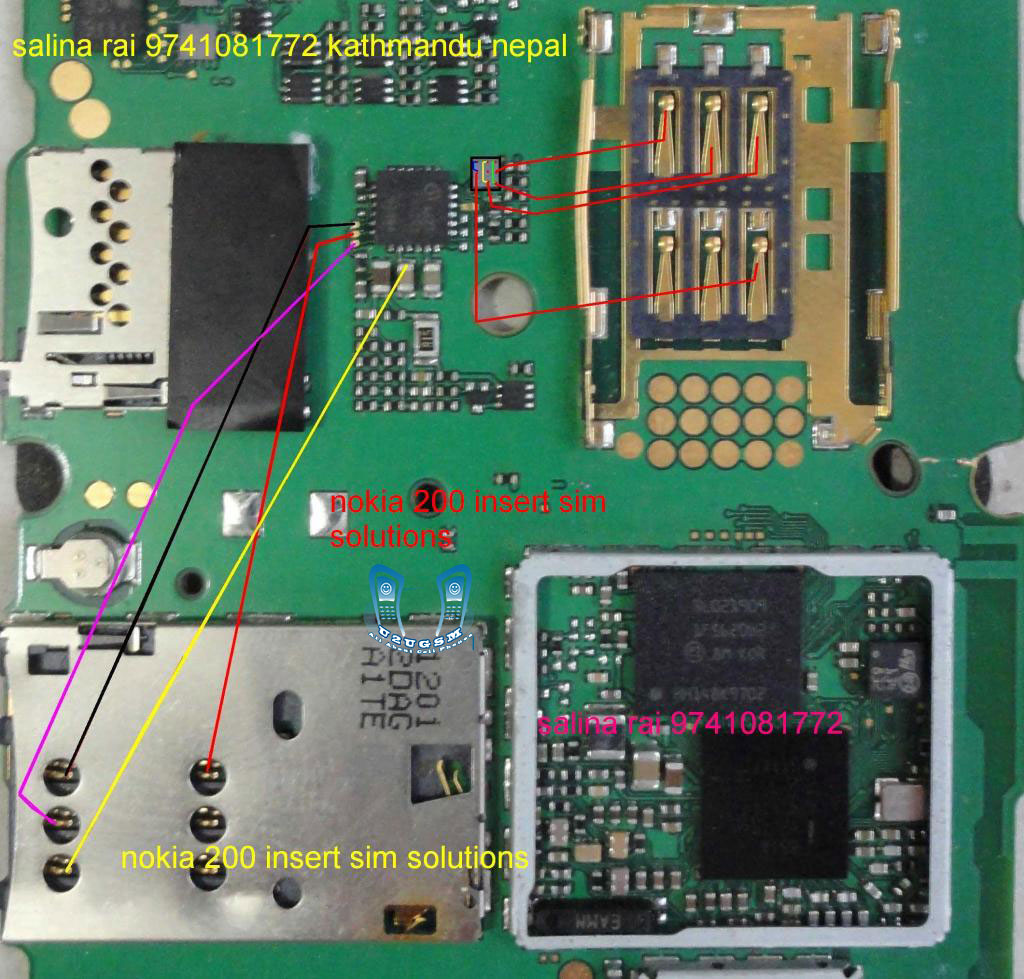
Nokia Asha 201 insert sim solution 100 % tested solution nokia Asha 201 insert sim solution , nokia Asha 201 insert sim 1 solution , nokiaAsha 201insert sim solution ,, Asha 201 insert sim 2 solution , nokia Asha 201 sim 2 insert solution , nokiaAsha 201 insert sim solution , nokia Asha 201 insert sim 2 , nokia Asha 201 insert sim final solution, nokia Asha 201 sim 2 100 solution, insert sim nokia Asha 201 test 100, nokia Asha 201 insert sim 2 solution all links ok,
Monday, August 25, 2014
Nokia Asha 501 Dual SIM RM 902 Latest Version 10 0 2 Flash File Free Download
Nokia Mobile Asha 501 Dual SIM RM-902 Latest Version 10.0.2 Flash File Free Download

Phone Name : Nokia Mobile Asha 501 Dual SIM
Product Type : RM-902
Firmware Version : 10.0.2
Variant Id : N/A
Varian Name : RM-902 NDT EURO EA1 B_GREEN NULL RU
Product Code : 059S9N9
Product Type : RM-902
Firmware Version : 10.0.2
Variant Id : N/A
Varian Name : RM-902 NDT EURO EA1 B_GREEN NULL RU
Product Code : 059S9N9
File Name : RM902_059S9N9_hwt_v010.bin
File Size : 212 bytes
File Name : RM902_SD_4GB_Empty.img_10.0.2.cardverref.xml
File Size : 268 bytes
File Name : RM902_059S9N9_ccc_v010.bin
File Size : 488 bytes
File Name : S40NG_simlock_3gstandard_bb5.bin
File Size : 964 bytes
File Name : DC_WP8_Template_S40_v4.bin
File Size : 1,05 Kb
File Name : RM902_059S9N9_10.0.2_010.spr
File Size : 1,12 Kb
File Name : RM902_059S9N9_10.0.2_010_signature.bin
File Size : 1,52 Kb
File Name : RM902_059S9N9_10.0.2_010.vpl
File Size : 4,61 Kb
File Name : P11352003dpi600_label_layout.xml
File Size : 4,94 Kb
File Name : P11352003dpi600.pcx
File Size : 16,02 Kb
File Name : RM902_059S9N9_10.0.2_010.dcp
File Size : 163,18 Kb
File Name : rm902_10.0.2_059S9N9_ea1.rofs.fpsx
File Size : 4,11 Mb
File Name : RM902_SD_4GB_Empty.img_10.0.2.fpsimage
File Size : 8,06 Mb
File Name : rm902_10.0.2_059S9N9_ea1.image.fpsx
File Size : 25,63 Mb
File Name : rm902_10.0.2.mcusw.fpsx2_10.0.2.mcusw.fpsx
File Size : 28,21 Mb
File Size : 212 bytes
File Name : RM902_SD_4GB_Empty.img_10.0.2.cardverref.xml
File Size : 268 bytes
File Name : RM902_059S9N9_ccc_v010.bin
File Size : 488 bytes
File Name : S40NG_simlock_3gstandard_bb5.bin
File Size : 964 bytes
File Name : DC_WP8_Template_S40_v4.bin
File Size : 1,05 Kb
File Name : RM902_059S9N9_10.0.2_010.spr
File Size : 1,12 Kb
File Name : RM902_059S9N9_10.0.2_010_signature.bin
File Size : 1,52 Kb
File Name : RM902_059S9N9_10.0.2_010.vpl
File Size : 4,61 Kb
File Name : P11352003dpi600_label_layout.xml
File Size : 4,94 Kb
File Name : P11352003dpi600.pcx
File Size : 16,02 Kb
File Name : RM902_059S9N9_10.0.2_010.dcp
File Size : 163,18 Kb
File Name : rm902_10.0.2_059S9N9_ea1.rofs.fpsx
File Size : 4,11 Mb
File Name : RM902_SD_4GB_Empty.img_10.0.2.fpsimage
File Size : 8,06 Mb
File Name : rm902_10.0.2_059S9N9_ea1.image.fpsx
File Size : 25,63 Mb
File Name : rm902_10.0.2.mcusw.fpsx2_10.0.2.mcusw.fpsx
File Size : 28,21 Mb
Friday, August 22, 2014
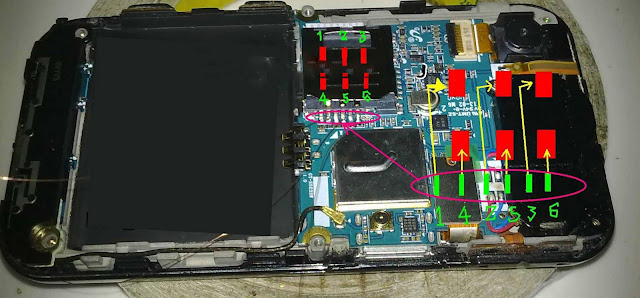
Wednesday, August 20, 2014
Nokia Asha 306 Insert Sim Ways Jumper Solution 100 Tested
Nokia 306 insert sim card solution,sim ways jumper,sim line missing,sim ways line damage,sim ic jumper,no sim card Ways Solution 100% Tested
![Nokia]()
Monday, August 18, 2014
Nokia asha 206 insert sim problem jumper solution
Nokia asha 200 sim problem solution is very important for mobile phone repairer.This post help every mobile repairer for nokia asha 200 insert sim problems repair.this is two sim phone. So it is different motherboard between one sim phone.Every repairer can repair this phones both sim problems using this solution.
![Noki]()
Tuesday, August 12, 2014

Subscribe to:
Posts (Atom)