Showing posts with label asha. Show all posts
Showing posts with label asha. Show all posts
Monday, November 17, 2014
Nokia Asha 303 Display LCD Light Solution By Jumper
In nokia Asha 303 lcd light problem display led light problem, display light not working can be solve in a few easy steps that are posted in this post. So read it carefully and see diagram bellow to solve light problem in nokia Asha 303 lcd display:
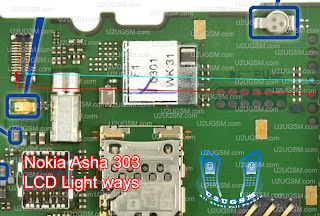
Check lcd jack and lcd jack on board clean them with electronics cleaner and leave it to dry under electrical bulb or apply some hot air so that it can be dry. Check these two links shown in diagram with different colors and if any of them is broken then please make jumpers to solve light problem in nokia Asha 303.

Friday, November 7, 2014
Nokia Asha 230 Insert Sim Solution With Jumper Way

Nokia Asha 230 insert sim problem solution With Jumper Way . 100% Tested
Nokia Asha 230 Sim ic jumper. Nokia Asha 230 Dual Sim Not Working SolutionThursday, November 6, 2014
Nokia Asha 300 Ringer Problem Solution jumpers
Nokia Asha 300 ringer problem can be solve with a few steps that are given in diagram bellow so look at diagram bellow to solve love ringer voice, no ringer tones, no ringer working problems in nokia asha 300.in diagram there are two colors blue and red both colors are defining path of circuit in mobile phone.

Check ringer and if ringer do not show continuity or a good value with meter then change ringer with new one. Check points on board where ringer have to attaché after put in casing housing.
Then check all these paths as shown in diagram above and if any of them is broken or missing components then apply jumpers as described above. Small circle shows positions where we are able to make jumpers. in these place we can apply jumpers to solve ringer problem in nokia asha 300.
for more detail and new tips and tricks about cellphone service problem keep visiting this page we will update daily this blog timely with other mobile solution.
Check ringer and if ringer do not show continuity or a good value with meter then change ringer with new one. Check points on board where ringer have to attaché after put in casing housing.
Then check all these paths as shown in diagram above and if any of them is broken or missing components then apply jumpers as described above. Small circle shows positions where we are able to make jumpers. in these place we can apply jumpers to solve ringer problem in nokia asha 300.
for more detail and new tips and tricks about cellphone service problem keep visiting this page we will update daily this blog timely with other mobile solution.
Wednesday, October 29, 2014
Nokia Asha 311 WiFi Not working Problem Solution Ways
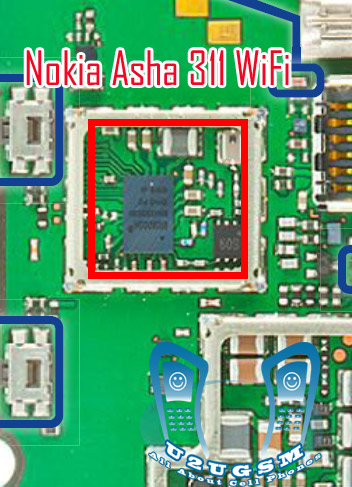 WiFi is used for networking a Smartphone with some other networking devices and it works for VPN (Virtual Private Network ) to gain a high speed broadband speed at you smart phone Nokia 2320 Classic Hang problem solutionsee all cellular mobile repairing solution
in above diagram you can see a red line that identify parts used in wifi function in Nokia Asha 311.So after disassemble of mobile phone look all these parts very carefully and if there is some rust or water damages clean them with electronics cleaner and apply smoth heat with hot air. do not apply to much air because it can harm your skin and also can damage the mother board.
So re flow resold these parts and if it can not solve problem replace these parts that are given in above diagram.
for more detail and new tips and tricks about cellphone service problem keep visiting this page we will update cellphone service diagrams timely with new cellphone diagrams.some related post are also given bellow you can read them also for more information about cellphone.
Saturday, October 18, 2014
Nokia Asha 311 Mic Problem Jumpers Ways Solution
Nokia Asha 311 have mic problem our voice can not reach to destination and we can not record voice in it.mic problem can be reason of parts damages or carbon rust and water damages.so to solve this issue in Nokia Asha 311 look at diagram bellow and check all these components and parts.these parts are used in Microphone function in Nokia Asha 311.Nokia C2-01 ringer problem solution jumper ways see All cellular mobile repair solution

once you have dis assembled mobile phone look at board vary carefully and check if there is some rust or carbon.Clean
these parts and area with electronics cleaner and leave it to dry for a few mints with hot air.In above diagram all tracks are given in red and blue colors.these tracks show positive and negative paths of mic parts.so check these components and paths with electronics miter and if path missing apply jumpers.
Because mic is attached with board so you can remove it with solding iron by applying much solder on mic and then slip it once it is too hot.And use new mic to fix mic problem in Nokia Asha 311.
for more detail and new tips and tricks about cellphone service problem keep visiting this page we will update cellphone service diagrams timely with new cellphone diagrams.some related post are also given bellow you can read them also for more information about cellphone.
once you have dis assembled mobile phone look at board vary carefully and check if there is some rust or carbon.Clean
these parts and area with electronics cleaner and leave it to dry for a few mints with hot air.In above diagram all tracks are given in red and blue colors.these tracks show positive and negative paths of mic parts.so check these components and paths with electronics miter and if path missing apply jumpers.
Because mic is attached with board so you can remove it with solding iron by applying much solder on mic and then slip it once it is too hot.And use new mic to fix mic problem in Nokia Asha 311.
for more detail and new tips and tricks about cellphone service problem keep visiting this page we will update cellphone service diagrams timely with new cellphone diagrams.some related post are also given bellow you can read them also for more information about cellphone.
Friday, October 17, 2014
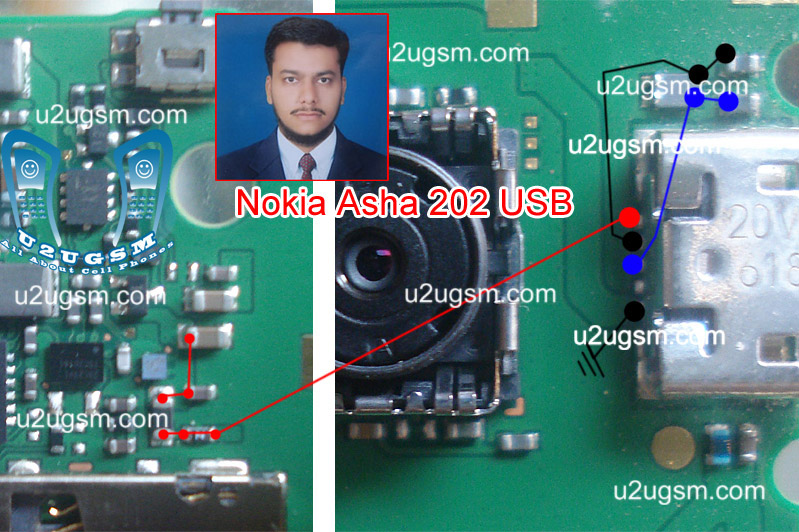
Nokia Asha 203 Usb Not Charging Problem Solution Jumper Ways
nokia sha 203 is not charging with usb or usb can not be detected it can be cause of water damages. Carbon in usb base. Broken or damage parts and may be due to burn components.To solve usb not charging in nokia asha 203 you can read this post which also contains a usb not charging repairing diagram for nokia asha 203.nokia Asha 203 Mic problem solution jumper ways

In above diagram you can see Red, Blue & Black lines these are used in usb charging and usb data functions. Check USB charging jack if it have some carbon or rust then clean it with CTC and apply heat to make it Dry.
If USB charging jack of nokia asha 203 is damage or Replace it. If a few pins are missing then check all these tracks that are given in above Nokia asha 203 usb not charging diagram. If any print out of these is missing apply jumpers.
Check all these parts and if any of them is broken or damage apply jumpers. If jumpers can not solve usb data & charging problem of nokia asha 203 then replace these parts.
for more detail and new tips and tricks about cellphone service problem keep visiting this page we will update cellphone service diagrams timely with new cellphone diagrams.some related post are also given bellow you can read them also for more information about cellphone.
In above diagram you can see Red, Blue & Black lines these are used in usb charging and usb data functions. Check USB charging jack if it have some carbon or rust then clean it with CTC and apply heat to make it Dry.
If USB charging jack of nokia asha 203 is damage or Replace it. If a few pins are missing then check all these tracks that are given in above Nokia asha 203 usb not charging diagram. If any print out of these is missing apply jumpers.
Check all these parts and if any of them is broken or damage apply jumpers. If jumpers can not solve usb data & charging problem of nokia asha 203 then replace these parts.
for more detail and new tips and tricks about cellphone service problem keep visiting this page we will update cellphone service diagrams timely with new cellphone diagrams.some related post are also given bellow you can read them also for more information about cellphone.
Wednesday, October 15, 2014
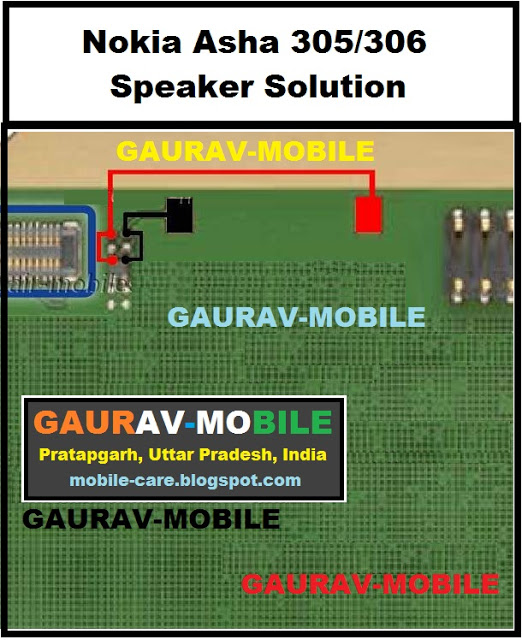
Nokia asha 305 speaker solution
If speaker is not working in Nokia asha 305. We can not hear a voice call.Noise in ear peace speaker or low voice problem can be solve with this post.Read carefully all these tips and follow diagram that is given bellow to solve speaker problem solution in Nokia asha 305.nokia 110 insert sim solution

In above diagram you can see red and blue lines.These lines are tracks and paths that are used in speaker function in Nokia asha 305. So check all these parts with meter and if any of them is missing apply jumper.You can apply jumper at points that are shown in diagram for repairing speaker problem solution.
ReadHere..
In above diagram you can see red and blue lines.These lines are tracks and paths that are used in speaker function in Nokia asha 305. So check all these parts with meter and if any of them is missing apply jumper.You can apply jumper at points that are shown in diagram for repairing speaker problem solution.
Monday, September 22, 2014
Nokia Asha 311 Mic Problem Jumpers Ways Solution
Nokia Asha 311 Mic Problem Jumpers Ways Solution
if Nokia Asha 311 have mic problem our voice can not reach to destination and we can not record voice in it.mic problem can be reason of parts damages or carbon rust and water damages.so to solve this issue in Nokia Asha 311 look at diagram bellow and check all these components and parts.these parts are used in Microphone function in Nokia Asha 311.
![Nokia]()
once you have dis assembled mobile phone look at board vary carefully and check if there is some rust or carbon.Clean
these parts and area with electronics cleaner and leave it to dry for a few mints with hot air.In above diagram all tracks are given in red and blue colors.these tracks show positive and negative paths of mic parts.so check these components and paths with electronics miter and if path missing apply jumpers.
Because mic is attached with board so you can remove it with solding iron by applying much solder on mic and then slip it once it is too hot.And use new mic to fix mic problem in Nokia Asha 311.
once you have dis assembled mobile phone look at board vary carefully and check if there is some rust or carbon.Clean
these parts and area with electronics cleaner and leave it to dry for a few mints with hot air.In above diagram all tracks are given in red and blue colors.these tracks show positive and negative paths of mic parts.so check these components and paths with electronics miter and if path missing apply jumpers.
Because mic is attached with board so you can remove it with solding iron by applying much solder on mic and then slip it once it is too hot.And use new mic to fix mic problem in Nokia Asha 311.
for more detail and new tips and tricks about cellphone service problem keep visiting this page we will update cellphone service diagrams timely with new cellphone diagrams.some related post are also given bellow you can read them also for more information about cellphone.
Wednesday, September 17, 2014
Nokia Asha 503 RM 920 Latest Firmware Version 12 0 26 Free Download
Nokia Asha 503 RM-920 Latest Firmware Version 12.0.26 Free Download

Phone Name : Nokia Asha 503
Product Type : RM-920
Firmware Version : 12.0.26
Variant Id : N/A
Varian Name : RM-920 NDT EURO EU1 IT
Product Code : 059S8X7
Product Type : RM-920
Firmware Version : 12.0.26
Variant Id : N/A
Varian Name : RM-920 NDT EURO EU1 IT
Product Code : 059S8X7
File Name : RM920_059S8X7_hwt_v273.bin
File Size : 216 bytes
File Name : rm920_12.0.26_Empty_SD_4GB.cardverref.xml
File Size : 264 bytes
File Name : RM920_059S8X7_ccc_v273.bin
File Size : 916 bytes
File Name : RM920_059S8X7_12.0.26_273.spr
File Size : 1,12 KiB
File Name : P11660901dpi600_label_layout.xml
File Size : 1,89 KiB
File Name : nontz_deviceiapsvctagcertificate_template_production_v12.bin
File Size : 2,43 KiB
File Name : RM920_059S8X7_12.0.26_273_signature.bin
File Size : 2,58 KiB
File Name : RM920_059S8X7_12.0.26_273.vpl
File Size : 4,63 KiB
File Name : S40NG_DCT4_open_simlock.sim
File Size : 7,07 KiB
File Name : P11660901dpi600.pcx
File Size : 13,64 KiB
File Name : RM920_059S8X7_12.0.26_273.dcp
File Size : 420,86 KiB
File Name : rm920_12.0.26_059S8X7_eu1.rofs.fls
File Size : 7,2 MiB
File Name : rm920_12.0.26_Empty_SD_4GB.fpsimage.fls
File Size : 8,41 MiB
File Name : rm920_12.0.26.mcusw.fls
File Size : 37,41 MiB
File Name : rm920_12.0.26_059S8X7_eu1.image.fls
File Size : 42,96 MiB
File Size : 216 bytes
File Name : rm920_12.0.26_Empty_SD_4GB.cardverref.xml
File Size : 264 bytes
File Name : RM920_059S8X7_ccc_v273.bin
File Size : 916 bytes
File Name : RM920_059S8X7_12.0.26_273.spr
File Size : 1,12 KiB
File Name : P11660901dpi600_label_layout.xml
File Size : 1,89 KiB
File Name : nontz_deviceiapsvctagcertificate_template_production_v12.bin
File Size : 2,43 KiB
File Name : RM920_059S8X7_12.0.26_273_signature.bin
File Size : 2,58 KiB
File Name : RM920_059S8X7_12.0.26_273.vpl
File Size : 4,63 KiB
File Name : S40NG_DCT4_open_simlock.sim
File Size : 7,07 KiB
File Name : P11660901dpi600.pcx
File Size : 13,64 KiB
File Name : RM920_059S8X7_12.0.26_273.dcp
File Size : 420,86 KiB
File Name : rm920_12.0.26_059S8X7_eu1.rofs.fls
File Size : 7,2 MiB
File Name : rm920_12.0.26_Empty_SD_4GB.fpsimage.fls
File Size : 8,41 MiB
File Name : rm920_12.0.26.mcusw.fls
File Size : 37,41 MiB
File Name : rm920_12.0.26_059S8X7_eu1.image.fls
File Size : 42,96 MiB
Monday, September 15, 2014
Nokia asha 501 charging solution
Now showing how to solve nokia asha 501 charging problem or not charging problems.This problems has may many reason now discus about hardware problems solution.check below diagram and work following the solution.

Sunday, September 14, 2014
Asha 201 200 Battery Connector Ways how to fix problem

are available in the following article. Also you will find Nokia Asha
201, Asha 200 Battery Connector Ways and Jumpers information in the
diagrams further in this post.
If your Nokia Asha 200, Asha 201 Battery Connector is damaged somehow
by whether mishandling or any other reason you can always replace it
with a new one. But if you have damaged the battery Connector prints
meaning Connection points on which the the Battery Connector is
soldered to the Nokia Asha 201, Asha 200 Battery Connector Ways
motherboard no need to worry, Diagrams on the end of this article can
help you.
Please Note that we will edit these solutions or add new ones if found
in this page at any time in the future. So feel free to come back any
time on this page to stay up to date.
If you have further Questions please don't hesitate to leave a comment.
Note: Every repairing solution posted here is tested by at least one
member of our team. Use the information available here at Your Own
Risk. We are not responsible if any harm comes to your device during
the repairing process.
Friday, September 12, 2014
Asha 201 200 Mic Ways how to fix problem

following article. Also you will find Nokia Asha 201 Mic Ways and
Jumpers information in the diagrams further in this post.
In Nokia Asha 200 Mic Problem can occur because of the faulty
Microphone or it's bad connection to the Cell Phone's Motherboard. Bad
connections can happen for many reasons like if it's dropped or got
wet, bad connection may also happen because of Carbon, Rust or even
Dirt. So first of all you should clean Nokia Asha 200 Mic Ways and
Motherboard of the Mobile Phone.
You Can Use any cleaning liquid for this purpose like CTC or any other
you prefer. If you are certain that the bad connection is not the
reason for your Mobile Phone's fault, then you can replace the Mic
with a new one.
Please Note that we will edit these solutions or add new ones if found
in this page at any time in the future. So feel free to come back any
time on this page to stay up to date.
If you have further Questions please don't hesitate to leave a comment.
Note: Every repairing solution posted here is tested by at least one
member of our team. Use the information available here at Your Own
Risk. We are not responsible if any harm comes to your device during
the repairing process.
Asha 203 Asha 202 LCD Ways how to fix problem
This article is for Nokia Asha 203 and Nokia Asha 202 LCD Problem Solution. It applies to both of these phones.
In Nokia Asha 202 LCD Problem can occur because of the faulty LCD Connector. So first of all you should clean LCD connector and the general area on the motherboard around it. If that does not work replace it but also make sure the LCD is not busted or broken. I have marked all the Nokia Asha 202 LCD Connector Ways in this diagram. I have marked all the LCD connector legs with different colors to avoid confusion. The Black marks indicate those points are negative.
Please Note that we will edit these solutions or add new ones if found in this page at any time in the future. So feel free to come back any time on this page to stay up to date.

If you have further Questions please dont hesitate to leave a comment.
Note: Every repairing solution posted here is tested by at least one member of our team. Use the information available here at Your Own Risk. We are not responsible if any harm comes to your device during the repairing process.
Tuesday, September 9, 2014
Nokia Asha 201 Insert Sim problem Solution Jumpers
Asha 201 insert sim 1, nokia Asha 201 insert sim 2 solution, nokia Asha 201 sim 2 insert sim, 100 sim solution, nokia Asha 201 insert sim2 100 tested solution, nokia Asha 201inset sim 100, nokia Asha 201 insert sim, u2u nokia 100 insart sim, nokia 100 sim, nokia Asha 201 inser sim solution, nokia Asha 201insat sim problem, nokia Asha 201 insart sim solution, nokia Asha 201 insert 1 and 2 solution
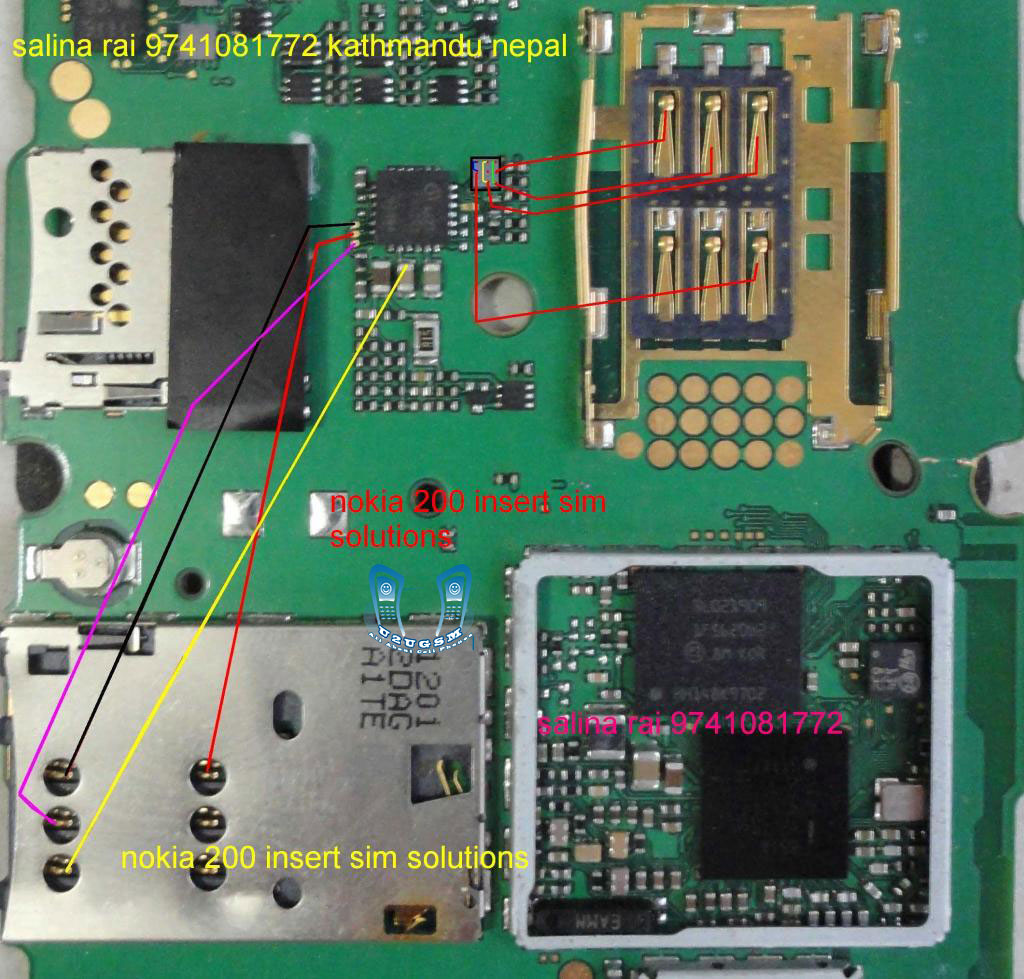
Nokia Asha 201 insert sim solution 100 % tested solution nokia Asha 201 insert sim solution , nokia Asha 201 insert sim 1 solution , nokiaAsha 201insert sim solution ,, Asha 201 insert sim 2 solution , nokia Asha 201 sim 2 insert solution , nokiaAsha 201 insert sim solution , nokia Asha 201 insert sim 2 , nokia Asha 201 insert sim final solution, nokia Asha 201 sim 2 100 solution, insert sim nokia Asha 201 test 100, nokia Asha 201 insert sim 2 solution all links ok,
Monday, September 8, 2014
Nokia Asha 311 3110 RM 714 Latest Firmware Version 5 92 Free Download
Nokia Asha 311 / 3110 RM-714 Update Flash File here Free Download Now

Phone Name : Nokia Asha 311 / 3110
Product Type : RM-714
Firmware Version : 5.92
Variant Id : 7133930956
Varian Name : Swu255172 Rm-714 Tmohu 0592 110 Dgrey V2
Product Code : 059Q9V3
Product Type : RM-714
Firmware Version : 5.92
Variant Id : 7133930956
Varian Name : Swu255172 Rm-714 Tmohu 0592 110 Dgrey V2
Product Code : 059Q9V3
File Name : Rm714 059q9v3 05.92 022.vpl
File Size : 3.57 Kb
File Name : Rm714 05.92.mcusw
File Size : 33.33 Mb
File Name : Rm714 05.92.ppm B
File Size : 11.54 Mb
File Name : Rm714 05.92.image B 059f729 059q9v3 558 03
File Size : 81.54 Mb
File Name : Rm714 05.92 Sd Central Europe 2048.fpsimage
File Size : 537.26 Mb
File Name : T-mobile Hungary Tmhu Simlock Crcf78ci.bin
File Size : 76 Bytes
File Name : 040 094021 01 Eu E4288ddb.pcx
File Size : 15.2 Kb
File Name : 040 094021 Rm714 Label English Mome 004 C4807d43.xml
File Size : 5.58 Kb
File Name : Rm714 059q9v3 Cmt Ccc V2.0.bin
File Size : 488 Bytes
File Name : Rm714 059q9v3 Cmt Hwc V2.0.bin
File Size : 212 Bytes
File Name : Rm714 05.92 Sd Central Europe 2048.cardverref.xml
File Size : 289 Bytes
File Name : Rm714 059q9v3 05.92 022.dcp
File Size : 19.92 Kb
File Name : Rm714 059q9v3 022.spr
File Size : 1.12 Kb
File Name : Rm714 059q9v3 05.92 022 Signature.bin
File Size : 1.51 Kb
Tuesday, August 26, 2014

Monday, August 25, 2014
Nokia Asha 501 Dual SIM RM 902 Latest Version 10 0 2 Flash File Free Download
Nokia Mobile Asha 501 Dual SIM RM-902 Latest Version 10.0.2 Flash File Free Download

Phone Name : Nokia Mobile Asha 501 Dual SIM
Product Type : RM-902
Firmware Version : 10.0.2
Variant Id : N/A
Varian Name : RM-902 NDT EURO EA1 B_GREEN NULL RU
Product Code : 059S9N9
Product Type : RM-902
Firmware Version : 10.0.2
Variant Id : N/A
Varian Name : RM-902 NDT EURO EA1 B_GREEN NULL RU
Product Code : 059S9N9
File Name : RM902_059S9N9_hwt_v010.bin
File Size : 212 bytes
File Name : RM902_SD_4GB_Empty.img_10.0.2.cardverref.xml
File Size : 268 bytes
File Name : RM902_059S9N9_ccc_v010.bin
File Size : 488 bytes
File Name : S40NG_simlock_3gstandard_bb5.bin
File Size : 964 bytes
File Name : DC_WP8_Template_S40_v4.bin
File Size : 1,05 Kb
File Name : RM902_059S9N9_10.0.2_010.spr
File Size : 1,12 Kb
File Name : RM902_059S9N9_10.0.2_010_signature.bin
File Size : 1,52 Kb
File Name : RM902_059S9N9_10.0.2_010.vpl
File Size : 4,61 Kb
File Name : P11352003dpi600_label_layout.xml
File Size : 4,94 Kb
File Name : P11352003dpi600.pcx
File Size : 16,02 Kb
File Name : RM902_059S9N9_10.0.2_010.dcp
File Size : 163,18 Kb
File Name : rm902_10.0.2_059S9N9_ea1.rofs.fpsx
File Size : 4,11 Mb
File Name : RM902_SD_4GB_Empty.img_10.0.2.fpsimage
File Size : 8,06 Mb
File Name : rm902_10.0.2_059S9N9_ea1.image.fpsx
File Size : 25,63 Mb
File Name : rm902_10.0.2.mcusw.fpsx2_10.0.2.mcusw.fpsx
File Size : 28,21 Mb
File Size : 212 bytes
File Name : RM902_SD_4GB_Empty.img_10.0.2.cardverref.xml
File Size : 268 bytes
File Name : RM902_059S9N9_ccc_v010.bin
File Size : 488 bytes
File Name : S40NG_simlock_3gstandard_bb5.bin
File Size : 964 bytes
File Name : DC_WP8_Template_S40_v4.bin
File Size : 1,05 Kb
File Name : RM902_059S9N9_10.0.2_010.spr
File Size : 1,12 Kb
File Name : RM902_059S9N9_10.0.2_010_signature.bin
File Size : 1,52 Kb
File Name : RM902_059S9N9_10.0.2_010.vpl
File Size : 4,61 Kb
File Name : P11352003dpi600_label_layout.xml
File Size : 4,94 Kb
File Name : P11352003dpi600.pcx
File Size : 16,02 Kb
File Name : RM902_059S9N9_10.0.2_010.dcp
File Size : 163,18 Kb
File Name : rm902_10.0.2_059S9N9_ea1.rofs.fpsx
File Size : 4,11 Mb
File Name : RM902_SD_4GB_Empty.img_10.0.2.fpsimage
File Size : 8,06 Mb
File Name : rm902_10.0.2_059S9N9_ea1.image.fpsx
File Size : 25,63 Mb
File Name : rm902_10.0.2.mcusw.fpsx2_10.0.2.mcusw.fpsx
File Size : 28,21 Mb
Wednesday, August 20, 2014
Nokia Asha 306 Insert Sim Ways Jumper Solution 100 Tested
Nokia 306 insert sim card solution,sim ways jumper,sim line missing,sim ways line damage,sim ic jumper,no sim card Ways Solution 100% Tested
![Nokia]()
Tuesday, August 19, 2014
Asha 203 Asha 202 Camera Ways how to fix problem
This post is for Nokia Asha 203 and Nokia Asha 202 Camera Problem Solution. This solution works for both models.
In Nokia Asha 202 Camera Problem problem can occur because of the faulty Camera Module or broken Camera Connector. So first of all you should clean Nokia Asha 202 Camera Connector Ways and Motherboard of the Mobile Phone. If that does not work then you can replace the Camera Module. If in any case you have broken any of the camera connectors legs, I have marked all of Nokia Asha 202 Camera Connector Ways in this diagram.
Please Note that we will edit these solutions or add new ones if found in this page at any time in the future. So feel free to come back any time on this page to stay up to date.

If you have further Questions please dont hesitate to leave a comment.
Note: Every repairing solution posted here is tested by at least one member of our team. Use the information available here at Your Own Risk. We are not responsible if any harm comes to your device during the repairing process.
Subscribe to:
Posts (Atom)