Showing posts with label 06. Show all posts
Showing posts with label 06. Show all posts
Friday, November 14, 2014
Nokia C2 06 Lcd Display Problem Solution Ways Jumpers
Nokia C2-06 Blank Lcd Display, Nokia C2-06 White Lcd Display, Nokia C2-06 Lcd Jack Damage Prints Missing.
Tools:-
To solve lcd display problem in Nokia C2-06 we have required a few tools and components.
Nokia screw Driver t5 and t4 for opening screw .
Lcd panel for Nokia C2-06
Electronics Cleaner for rust or water damage.
Hot air to dry the mother board.
Lcd Jack if we have to replace it.

Diagnosting & Solution:
After disassemble of Nokia C2-06 remove lcd and check lcd jack and its near by area for rust or water damages.
If here is some carbon on parts or at lcd jack.
Apply electronics cleaner and dry it with hot air for a few mint.
Do not apply so much heat it can harm your skin and mother board parts also.
Check with Lcd and if it is still blank replace with new one.
It might be possible that lcd jack pins are missing or not getting connected with lcd so change it.
Check all these links as given in above diagram in different colors so that you can find them easily.
Warnings:
Do not apply to much heat it can damage the mother board.
Make sure mother board is dry proper when you apply electronics clean.
Check Lcd jack and when removing it make sure solder has been melt.
If solder has not proper melt and you try to remove lcd jack prints might be damage.
When you replace lcd make sure lcd strip is proper fixed.
It can be damage when you assemble the phone if not in proper place.
for more detail and new tips and tricks about cellphone service problem keep visiting this page we will update daily this blog timely with other mobile solution.
Tools:-
To solve lcd display problem in Nokia C2-06 we have required a few tools and components.
Nokia screw Driver t5 and t4 for opening screw .
Lcd panel for Nokia C2-06
Electronics Cleaner for rust or water damage.
Hot air to dry the mother board.
Lcd Jack if we have to replace it.
Diagnosting & Solution:
After disassemble of Nokia C2-06 remove lcd and check lcd jack and its near by area for rust or water damages.
If here is some carbon on parts or at lcd jack.
Apply electronics cleaner and dry it with hot air for a few mint.
Do not apply so much heat it can harm your skin and mother board parts also.
Check with Lcd and if it is still blank replace with new one.
It might be possible that lcd jack pins are missing or not getting connected with lcd so change it.
Check all these links as given in above diagram in different colors so that you can find them easily.
Warnings:
Do not apply to much heat it can damage the mother board.
Make sure mother board is dry proper when you apply electronics clean.
Check Lcd jack and when removing it make sure solder has been melt.
If solder has not proper melt and you try to remove lcd jack prints might be damage.
When you replace lcd make sure lcd strip is proper fixed.
It can be damage when you assemble the phone if not in proper place.
for more detail and new tips and tricks about cellphone service problem keep visiting this page we will update daily this blog timely with other mobile solution.

Friday, November 7, 2014
Nokia C2 06 Ringer Problem Solution Jumper Ways
Nokia C2-06 ringer HF is not working, Nokia C2-06 Ringer Speaker is not working, Nokia C2-06 can not play music. We can not here voice during loud speaker in nokia c2-06.
Tools:-
Nokia key T4 and T5
Hot air.
Solding Iron.
Electronics Cleaner.
Nokia C2-06 Ringer

Diagnostic & Solutions:-
If Nokia C2-06 is not abble to ring a bell and we can not use loud speaker it might be fault of ringer or it may not be attached with mother board.
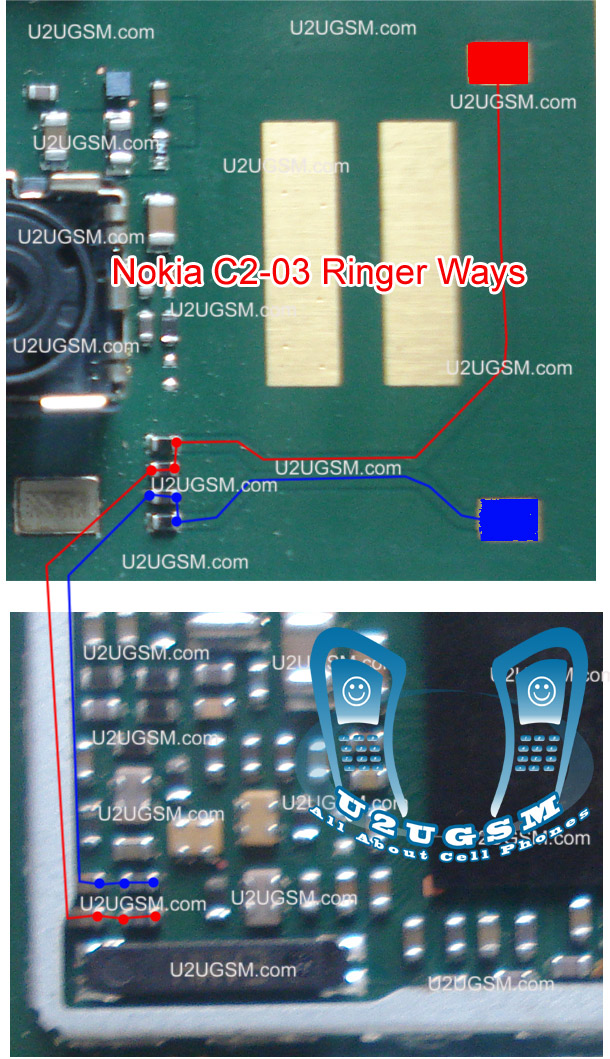
it can be damage or might be its not in proper location.It can be cause of Water damages and missing components,So lets solve the problem in a few simple steps as given in above diagram.
Disassemble Nokia C2-06 and check ringer points with electronics meter.If ringer shows good value then check point on the mother board and if the have also a good value it can be cause of miss fitting.
So assembly with proper placements and tight the screw and try it if not working then replace ringer with new one.If you find some prints missing then apply jumpers as given in above diagram. There are two different color lines Red and Blue.These lines indicates the negative and positive prints of ringer in Nokia C2-06 so apply these jumper to solve ringer problem in nokia C2-06
Warnings:-
Do not apply much heat with hot air it can damage the mother board and your skin.
Keep in mind about placement of ringer because it is not proper ringer will not work.
for more detail and new tips and tricks about cellphone service problem keep visiting this page we will update daily this blog timely with other mobile solution.
Tools:-
Nokia key T4 and T5
Hot air.
Solding Iron.
Electronics Cleaner.
Nokia C2-06 Ringer
Diagnostic & Solutions:-
If Nokia C2-06 is not abble to ring a bell and we can not use loud speaker it might be fault of ringer or it may not be attached with mother board.
it can be damage or might be its not in proper location.It can be cause of Water damages and missing components,So lets solve the problem in a few simple steps as given in above diagram.
Disassemble Nokia C2-06 and check ringer points with electronics meter.If ringer shows good value then check point on the mother board and if the have also a good value it can be cause of miss fitting.
So assembly with proper placements and tight the screw and try it if not working then replace ringer with new one.If you find some prints missing then apply jumpers as given in above diagram. There are two different color lines Red and Blue.These lines indicates the negative and positive prints of ringer in Nokia C2-06 so apply these jumper to solve ringer problem in nokia C2-06
Warnings:-
Do not apply much heat with hot air it can damage the mother board and your skin.
Keep in mind about placement of ringer because it is not proper ringer will not work.
for more detail and new tips and tricks about cellphone service problem keep visiting this page we will update daily this blog timely with other mobile solution.
Wednesday, November 5, 2014
Nokia C2 06 MMC Memory Card Problem Solution Ways
if Nokia C2-06 MMC is not working or it do not accept memory card it can be cause of water damage and rust. It can be due to MMC jack and damage pins. And this problem can be reason of MMC I.C So lets check all these parts and try to Repair Memory card Problem in Nokia C2-06.

The above diagram have a red line to show you which parts are used in Memory Card function so check these parts and in first step try to clean them with electronics cleaner and apply some hot air to dry it.
Once it is dry check and if not working then replace this I.C to solve memory card problem in Nokia C2-06.
The above diagram have a red line to show you which parts are used in Memory Card function so check these parts and in first step try to clean them with electronics cleaner and apply some hot air to dry it.
Once it is dry check and if not working then replace this I.C to solve memory card problem in Nokia C2-06.
Wednesday, October 29, 2014
Nokia C5 06 Display Problem Lcd Solution Jumpers
If you have display problem, White or blank display, Lcd problem in Nokia C5-06. All these problems can be sort out and to be fix with a few tips and diagnostics that I am going to write in this post.nokia Asha 202 Camera Problem Solution Jumper Ways

A diagram to repair Nokia C5-06 display problem is also attached with this post as above.After dis assembly of Nokia C5-06 try to replace lcd. If lcd replacement can not solve display problem in Nokia C5-06.
Check all these tracks that are given in above Display repairing diagram for Nokia C5-06. These different color lines are identifying the paths and components that are used in display function of Nokia C5-06.
Check all these parts with meter and if any of them is missing or damage apply jumpers as given in above diagram for Nokia C5-06 blank lcd white display or no display solution.
This diagram is sent to us by one of our guest poster and it is taken from gem-flash a gsm portal.
for more detail and new tips and tricks about cellphone service problem keep visiting this page we will update cellphone service diagrams timely with new cellphone diagrams.some related post are also given bellow you can read them also for more information about cellphone.
ReadHere..
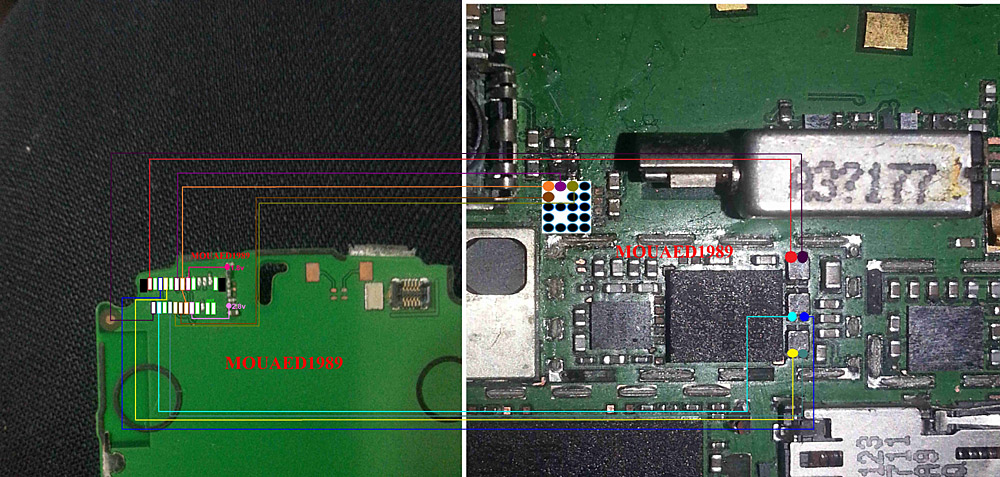
A diagram to repair Nokia C5-06 display problem is also attached with this post as above.After dis assembly of Nokia C5-06 try to replace lcd. If lcd replacement can not solve display problem in Nokia C5-06.
Check all these tracks that are given in above Display repairing diagram for Nokia C5-06. These different color lines are identifying the paths and components that are used in display function of Nokia C5-06.
Check all these parts with meter and if any of them is missing or damage apply jumpers as given in above diagram for Nokia C5-06 blank lcd white display or no display solution.
This diagram is sent to us by one of our guest poster and it is taken from gem-flash a gsm portal.
for more detail and new tips and tricks about cellphone service problem keep visiting this page we will update cellphone service diagrams timely with new cellphone diagrams.some related post are also given bellow you can read them also for more information about cellphone.
Friday, September 19, 2014
Nokia C1 01 Rm 607 Latest Version 06 07 Flash Files Free Download
Nokia C1-01 Rm 607 Latest Flash Files Mcu Ppm Cnt Free Download
![Nokia]()
DOWNLOAD LINKS
Nokia C1-01 Rm 607 Latest Flash Files Mcu Ppm Cnt Free DownloadWednesday, September 3, 2014
Nokia C5 06 rm 816 latest Firmware Version 23 6 015 flash files Free Download
Nokia c5 06 rm 816 latest 23.6.015 Firmware flash file free download Software version: 23.6.015

Download
Subscribe to:
Posts (Atom)